
Quickstart
From the first screen to your first trade in a couple of minutes. You need a Telegram account and a small amount of BTC.
Onboarding
Section titled “Onboarding”-
Open the bot. Start a chat with @OpaleBot_bot and tap Start.
-
Pick a language. First screen offers English or 中文. Your choice is saved; tap the language button later from ❓ Help to switch.
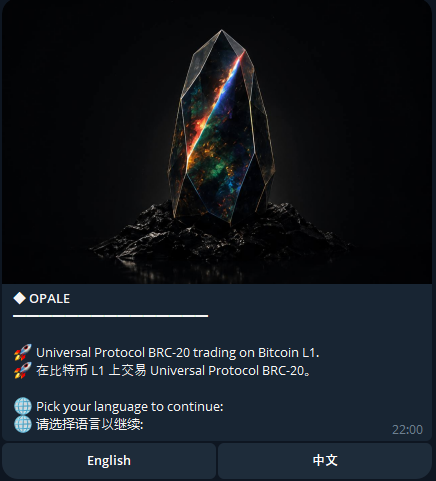
The first screen after /start: language picker. -
Open your wallet. Two options on this screen:
- ✨ Create my wallet — OPALE generates a fresh Bitcoin wallet under your account. The recovery phrase stays hidden; tap 👁️ Reveal to see it and write it down somewhere safe.
- 📥 Import existing wallet — already have a Bitcoin wallet? Paste a 12 / 24-word recovery phrase or a 32-byte private key (64 hex chars). OPALE replaces its auto-generated seed with yours and offers to sweep any starter BTC across in the same flow. Your pasted message is deleted from chat right after parsing.
-
Choose how to deposit. OPALE offers four options:
- ₿ I have BTC — show your Bitcoin deposit address as a QR.
- 🌐 I have crypto on another chain — start a Relay-powered swap from Ethereum, Solana, Base, etc. into BTC.
- 💵 Buy with USD (soon) — fiat on-ramp, coming.
- 🏠 Skip for now — go to the home screen and deposit later from 💰 Wallet.
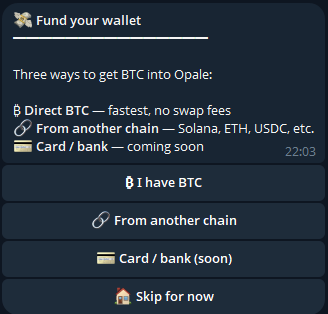
Deposit picker shown right after the wallet is created. -
Send BTC. Tap ₿ I have BTC, scan the QR or copy the address, and send from any Bitcoin wallet. OPALE credits the balance after 1 confirmation (typically 10–30 minutes). You’ll get a notification in chat when it lands. No BTC at hand? Use a cross-chain deposit instead — swap from Ethereum, Solana, Base, etc. via Relay in one flow.
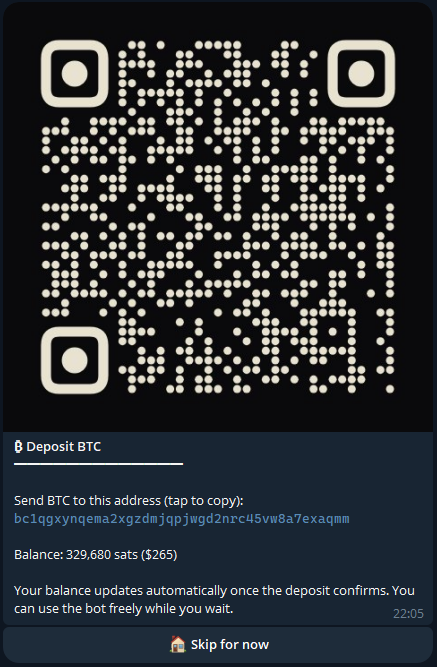
BTC deposit address shown as QR + copyable text.
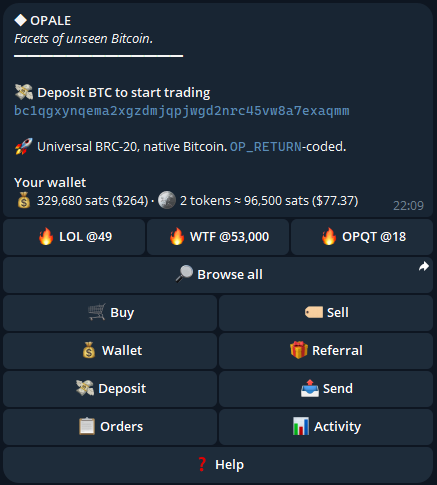
Make your first trade
Section titled “Make your first trade”-
Open the buy menu. From the home screen tap 🛒 Buy. You’ll see hot tickers as buttons; tap 🔎 Browse all if you want the full list.
-
Pick a token. Tap a ticker (e.g. 🔥 LOL). OPALE opens that token’s listings, sorted cheapest-first.
-
Pick a listing or set a quote. Tap a listing to buy it directly, or use the amount/price pickers to ask for a fixed quantity at a max price.
-
Confirm. OPALE shows the quote — total cost in BTC + USD, the 5 % fee, and the network fee. Tap ✅ Confirm Buy.
-
Watch the receipt. A new message tracks the transaction live:
Broadcasting → mempool → onchain → credited. The final state stays in chat permanently — that’s your receipt.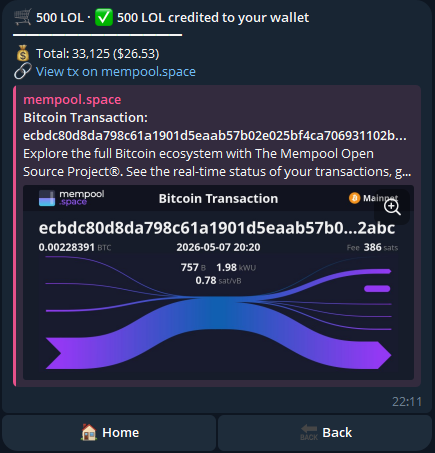
Final buy receipt — permanent message with token amount, BTC spent, fee breakdown, txid. -
Check your activity. Tap 📊 Activity to see executed orders. 📋 Orders shows pending limit orders if you placed any.
When it’s time to exit
Section titled “When it’s time to exit”- Sell at market — tap 🏷️ Sell, pick the holding, set the amount, set a unit price. OPALE posts the listing on WhiteNode. Posting is guaranteed; the fill depends on a buyer.
- Set a limit — tap 🎯 Sell limit to wait for the market to cross a target price before listing.
- Send to a friend — from 💰 Wallet, tap 📨 Send Tokens, pick the token and paste the recipient’s Bitcoin address. No marketplace fee.
Next steps
Section titled “Next steps”- Trading fee — how the 5 % is taken and what it replaces.
- Price caps & races — how max-unit-price protects you, and when you can lose a race.
- Your wallet — what OPALE holds for you and how to take it with you.
- Withdraw BTC — move funds back out when you’re done.