
Sell
🏷️ Sell posts a sell listing on WhiteNode for the amount and unit price you choose. OPALE charges no fee on selling — you only pay the Bitcoin network fee for the listing transaction.
The button flow
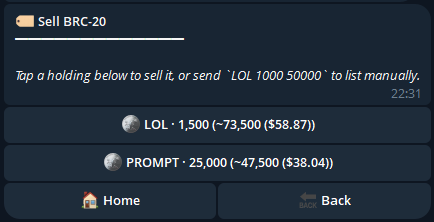
Section titled “The button flow”- From the home screen tap 🏷️ Sell. OPALE shows your top holdings as buttons (ticker · available · estimated value).
-
Tap a holding. Or tap 🔎 Browse all to find one not in the top list.
-
Set the amount. Type a number, or tap a preset percentage (25 % / 50 % / 75 % / max).
-
Set the unit price in sats per token. Type a number, or tap a preset (e.g. floor / floor +5 % / floor +10 %).
-
Read the listing quote. OPALE shows the total payment if filled, the network fee, and a USD inline.
-
Tap ✅ Confirm Listing. OPALE builds the listing transaction, posts it to WhiteNode, and broadcasts.
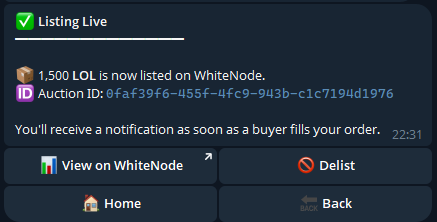
- Watch for fills. Posting the listing is guaranteed if you still hold the tokens. Filling depends on the market — a buyer has to match your price. OPALE notifies you in chat when a listing fills.
The Confirm screen has ❌ Cancel next to ✅ Confirm Listing, a 🎯 Sell limit button if you’d rather wait for a higher price before posting, and a 📐 Split into multiple listings button to break the bag into 2–10 smaller listings (see below).
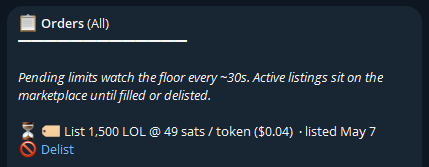
After posting, the receipt has a 🚫 Delist button that stays active until your listing fills. Tap it to remove the listing.
Split listings (one bag, many listings)
Section titled “Split listings (one bag, many listings)”If you’d rather post several smaller listings than one big block, tap 📐 Split into multiple listings on the sell quote. OPALE walks you through three quick steps:
- Pick how many listings —
2,3,5, or10. The total amount is divided evenly (the last listing absorbs any remainder so the math stays exact). - Pick a price mode:
- 🟰 Same price — every listing posts at the unit price you chose on the previous screen. Good for letting buyers chip away at one price level.
- 📈 Ladder up — listings are spaced evenly from your base price up to a top markup of
+10 %,+25 %, or+50 %. Good for capturing demand across a range without parking one big ask at the top.
- Read the breakdown. OPALE shows every listing’s amount, unit price, and total payment. Listings that would fall under WhiteNode’s 883-sat minimum are flagged and the confirm button is disabled — lower the count or raise the price first.
Tap ✅ Post N listings and OPALE posts each one sequentially (≈3 s each). A live progress message updates as each lands. The final receipt summarises how many succeeded and explains any that failed.
Splitting doesn’t sell faster on its own. If the orderbook is thin, breaking your bag into ten smaller listings just fragments the liquidity. Splitting works best when you expect the floor to keep clearing tranches, or when you want to capture demand at multiple price levels with the ladder mode.
Fast-path
Section titled “Fast-path”LOL 100 120List 100 LOL at 120 sats per token (total 12 000 sats). OPALE jumps straight to the quote.
Variants:
/sell LOL 100 120— explicit command form, identical behavior./sell LOL— guided: OPALE asks for amount and price./sell— fully guided.
Honesty about fills
Section titled “Honesty about fills”Posting your listing is guaranteed. Selling is not.
Once your listing is on WhiteNode, anyone can buy it, but only if your price is competitive enough. If you list well above the floor, expect to wait. If you list at or near the floor, expect a fast fill.
This is the same dynamic as a limit order on a normal exchange.
Why selling has no operator fee
Section titled “Why selling has no operator fee”OPALE’s 5 % fee is taken on buy-side flow only. Selling has no operator fee — you pay only the Bitcoin network fee for the listing transaction.
Limit sells
Section titled “Limit sells”To sell only when the market crosses a target, use a limit order: tap 🎯 Sell limit during a sell flow, or type LOL 100 @150000. OPALE polls the market and posts the listing when the unit price crosses 150 000 sats.
The same honesty rules apply: posting is guaranteed once the threshold crosses; fill timing depends on a buyer.
Receipt fields
Section titled “Receipt fields”| Field | What it means |
|---|---|
| Token | Ticker listed |
| Amount | Tokens listed |
| Unit price | Sats per token |
| Total | Sats you’d receive at full fill |
| Network fee | Bitcoin miner fee for posting the listing |
| Listing tx | Bitcoin transaction that created the listing |
| Fill | pending / filled — updates when a buyer hits |
Common issues
Section titled “Common issues”- “Insufficient token balance” — lower the amount or wait for any in-flight buys to credit.
- “Listing total below minimum” — WhiteNode and Bitcoin’s dust threshold combine to a small minimum; small/cheap listings can fall below it. Increase amount or unit price.