
Buy
🛒 Buy opens or adds to a position in any Universal Protocol token listed on WhiteNode. The home screen shows hot tickers as buttons; tap one to start buying. Most users never type a command.
For floor-buying many listings at once with a budget, see sweep. For waiting on a target price, see limit orders.
Before you buy
Section titled “Before you buy”- BTC balance. Fund first via deposit — tap 💰 Wallet to see your address.
- Pick a token. From the home screen, tap a hot ticker chip, or tap 🛒 Buy → 🔎 Browse all to search the full list.
- Decide your max unit price. The most you’re willing to pay per token, in sats. OPALE will only buy listings priced at or below this cap.
The button flow
Section titled “The button flow”-
From the home screen, tap 🛒 Buy. OPALE shows the top tickers and a 🔎 Browse all button.
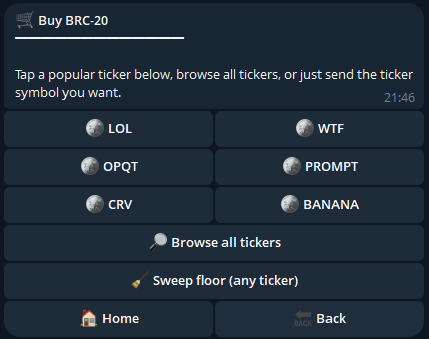
Buy menu: top tickers as quick-pick chips and Browse all + Sweep floor. -
Tap a ticker (or 🔎 Browse all → search → tap). OPALE opens the listings, sorted cheapest-first.
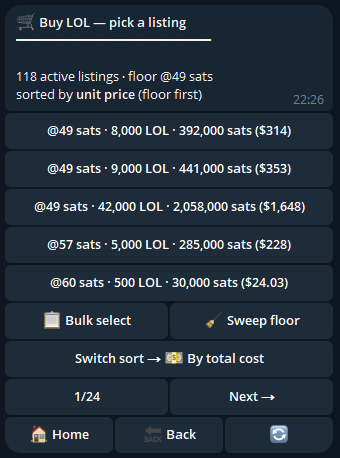
Listings picker for a ticker: 5 per page, sort toggle for unit vs total cost. -
Pick a listing or set a quote. Two paths:
- Tap a listing directly to buy that exact one.
- Use the amount and price pickers to ask for a specific quantity at a max unit price. OPALE picks the cheapest listings that match.
-
Read the quote. OPALE shows:
- Listings selected (count and total amount)
- Total cost in BTC + USD inline
- The flat 5 % fee
- Network fee preview
- Change going back to your balance
-
Tap ✅ Confirm Buy. OPALE rebuilds the seller’s transaction, swaps in our 5 % fee, adds your inputs, signs and broadcasts.
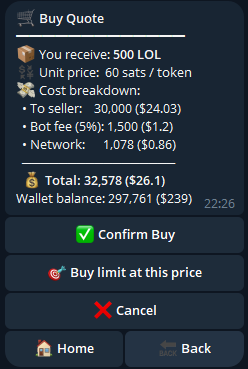
Buy quote screen: amount, total in BTC + USD, 5% fee, network fee, change. Confirm Buy + Cancel. -
Watch the receipt. A tracker message advances through
Broadcasting → mempool → onchain → credited. The final state stays in chat as your permanent receipt.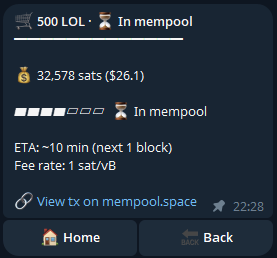
Live receipt mid-flight: state badge transitioning from broadcasting → mempool → onchain → credited.
The Confirm screen always has a ❌ Cancel button next to ✅ Confirm Buy. If your BTC balance is short, OPALE shows a 💰 Wallet button so you can top up without losing the quote, and a 🎯 Buy limit button to wait for the price instead.
Fast-path for power users
Section titled “Fast-path for power users”If you’d rather skip the menus, type the ticker, amount and max unit price in one line:
LOL 1000 50000That means: buy 1 000 LOL, max 50 000 sats per token. OPALE jumps straight to the quote screen.
Variants:
/buy LOL 1000 50000— explicit command form, identical behavior./buy LOL— guided: OPALE asks for amount and max price step by step./buy— fully guided: OPALE asks for ticker, amount and max price.
Honesty about races
Section titled “Honesty about races”Listings on WhiteNode are first-broadcast-wins. Two users can target the same listing at the same time, and only one transaction confirms. If yours loses:
- Single buy: OPALE retries with the next cheapest listing within your budget and cap, up to 3 times.
- Sweep: OPALE moves to the next cheapest until your budget or cap is exhausted.
- After retries, if no listings remain within your constraints, the order closes and you keep your BTC.
You will not see “Buy faster!” or “Pay more fee to win” prompts — Bitcoin without RBF is first-broadcast-wins, not highest-fee-wins, and OPALE is honest about that.
What you’ll see in the receipt
Section titled “What you’ll see in the receipt”| Field | What it means |
|---|---|
| Token | Ticker bought |
| Amount out | Tokens credited to your balance |
| Total spent | BTC actually spent (excludes change returned) |
| Avg unit price | Weighted average price across the filled listings |
| Operator fee | The 5 % flat fee, in sats |
| Network fee | Bitcoin miner fee for the transaction |
| Tx | Link to the Bitcoin transaction on an explorer |
| State | broadcasting / mempool / onchain / credited — live until terminal |
Common issues
Section titled “Common issues”- “Insufficient balance” — your BTC is below total cost. Lower the amount or top up via deposit. The Confirm screen shows a 💰 Wallet shortcut.
- “No listings within cap” — your max unit price is below every available listing. Raise the cap or pick a different token.
- Lost the race — covered above; OPALE retries within budget. After all retries fail, the order closes cleanly.
For other failures, see troubleshooting.
Related
Section titled “Related”- Mint — primary-market claim of newly-issued tokens (zero bot fee)
- Sweep — bulk floor buying with a budget
- Sell · Limit orders
- Activity & history
- Price caps & races